Society Management Software: 12 Questions to Ask Before You Choose
Accounting, gate security, DPDP readiness, data export, setup and real cost — twelve questions that help a committee compare society management apps on what matters, not on what demos well.
Most committees choose society management software the same way: someone's cousin's society uses an app, a sales call goes well, there's a demo of a slick visitor screen, and the decision is made. Six months later the treasurer is still keeping a parallel Excel sheet, because the "accounting" turned out to be a payment collection screen. This guide gives you the questions to ask before choosing society management software, so you compare what matters to your committee, not what demos well.

Start with your problem, not the feature list
Before any demo, write down the three things that cause your committee the most pain today. For most Indian societies they come from this list:
- maintenance collection and arrears
- accounts and audit
- gate security and visitor tracking
- resident communication and complaints
- committee handovers, where knowledge walks out the door every two years
Score every product against your three problems first. A long feature list matters far less than how well it solves those.
Accounting: 4 questions
Accounting is where products differ most, and it's the part that's hardest to switch later.
1. Is it real double-entry accounting, or a collection ledger? Ask to see a trial balance, a balance sheet and an income and expenditure account produced from the demo data. If the vendor exports to Excel and says "your CA can do the rest", you'll still be paying for a second set of books.
2. Will your auditor accept the output? Show your auditor a sample trial balance and balance sheet. Do they recognise the format? Can they drill from a balance down to individual entries? Most Indian society auditors are used to Tally's layout.
3. Does it handle your funds properly? Sinking fund and repairs fund must post to their own fund accounts, not to income. See sinking fund vs repairs fund for why. Ask how fixed deposits, interest and maturity are tracked.
4. Does billing follow your bye-laws? Per sq ft, per flat, or a hybrid. Separate heads for sinking fund, repairs fund, parking, non-occupancy charges. Simple interest on arrears at your general body's rate. GST only above the threshold. We cover the formula in how society maintenance charges are calculated. If the software forces you to bend your bye-laws to fit it, look elsewhere.
Security and gate: 3 questions
5. Does the gate work when the internet doesn't? Ask what happens when the guard's phone has no signal for twenty minutes. Visitors still arrive.
6. How do guards log in? A shared password stuck on the security cabin wall isn't security. Look for individual guard logins, quick but safe sign-in (a PIN on a trusted device, for example), and access that is withdrawn the day a guard leaves.
7. Can residents pre-approve visitors and staff? Pre-approval cuts the intercom calls, keeps the gate moving, and means the guard collects less personal data at the gate.
Data and privacy: 2 questions
8. Is it ready for the DPDP Act? Under the DPDP Rules notified in November 2025, your society is responsible for the personal data it collects, including data held by your software vendor on your behalf. Ask where data is stored, who at the vendor can see it, how deletion and access requests are handled, and whether visitor data can be deleted after a set period. Our DPDP Act guide for housing societies has the full checklist.
9. Can you leave with your data? Ask for a complete export of members, ledgers and transactions in standard formats, without a support ticket. A vendor confident in its product makes leaving easy.
Adoption and support: 3 questions
10. Who will set it up, and who moves your existing data? Opening balances, member dues, fund balances and FDs have to come across correctly on day one. Ask whether the vendor does the migration or hands you a template.
11. Will your oldest resident and your newest guard actually use it? Ask for the resident and guard apps in Indian languages, and try them yourself. If the app needs a manual, residents will go back to WhatsApp.
12. What does it really cost? Get the price per flat per month in writing, plus every add-on: SMS, payment gateway charges, accounting module, guard devices, onboarding. Compare total cost for your society size over three years, not the headline price.
A simple scoring sheet
| Area | Weight for your society | Product A | Product B |
|---|---|---|---|
| Accounting & audit | |||
| Billing per bye-laws | |||
| Gate & visitors | |||
| Privacy & data export | |||
| Setup & support | |||
| 3-year cost |
Set the weights from your three biggest problems, score each product 1–5 after a hands-on trial (not a demo), and decide in a managing committee meeting with the score sheet minuted. Your successors will thank you.
Quick quiz: judge the demo
Read the demo notes, then pick your answers. Tap a question's button to reveal the answer.
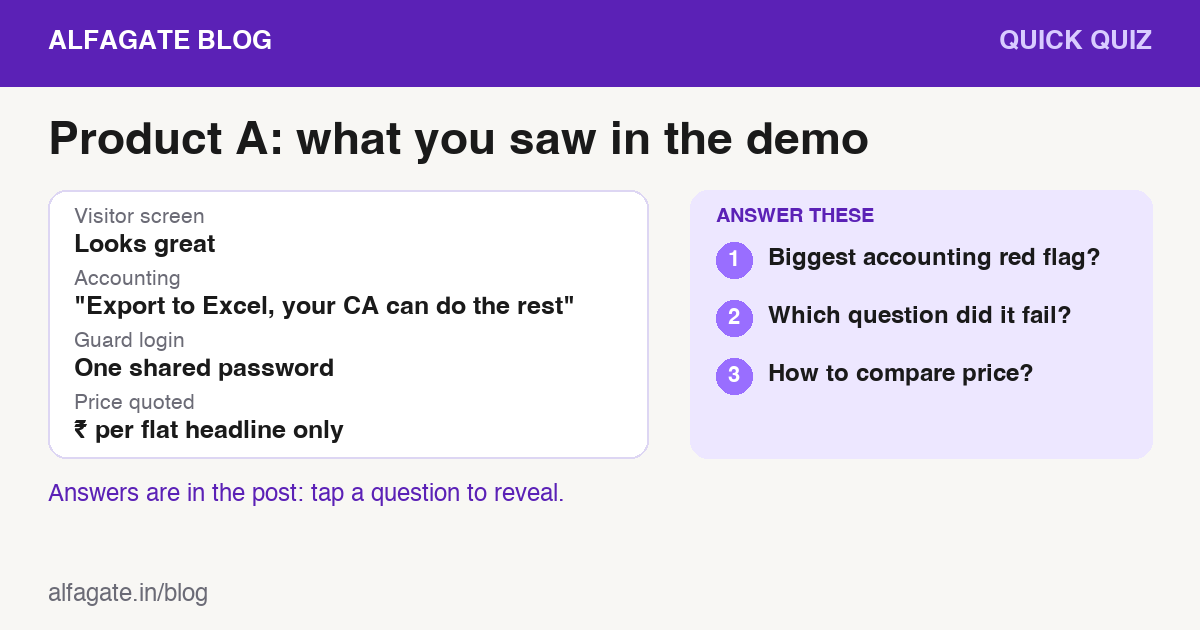
Q1. Which detail is the biggest warning on the accounting side?
- A. There is no trial balance or balance sheet. It only exports to Excel
- B. The screens use a violet colour
- C. It has a mobile app
Show answer
A. If you can't see a trial balance, balance sheet and income & expenditure account from the demo data, you'll still be paying for a second set of books.
Q2. A single shared password for all guards fails which of the 12 questions?
- A. Q6: How do guards log in?
- B. Q12: What does it really cost?
- C. Q9: Can you leave with your data?
Show answer
A. Individual guard logins, a quick but safe sign-in such as a PIN on a trusted device, and access withdrawn the day a guard leaves, are the minimum.
Q3. What is the right way to compare costs?
- A. The headline price per flat
- B. Total three-year cost including every add-on
- C. The cheapest SMS plan
Show answer
B. Get the price in writing plus SMS, payment gateway charges, accounting module, guard devices and onboarding, then compare total cost over three years for your society's size.
Got a question your society is stuck on? Send it to us, and we may answer it in a future post.
Where AlfaGate fits
AlfaGate was built for committees that want the society's books and its gate in one place: double-entry accounting with Tally-style trial balance and balance sheet, billing heads that follow your bye-laws, fixed deposit tracking, vendor payments, visitor management with resident pre-approvals, and guard logins with PIN on trusted phones. Put us through these twelve questions. Book a demo with your own society's numbers.
General guidance for committees evaluating software. Requirements vary by state law and by society. Involve your auditor and your managing committee in the final decision.

Khunt Jenish P.
Software developer at AlfaStack, building AlfaGate to make society management smarter, simpler, and more connected.